
第 15 章加入敵人後,玩家第一次需要「應對威脅」。如果玩家只能走路、跳躍和逃跑,敵人會讓關卡有壓力,但玩法選擇仍然很少。本章要加入第一個主動能力:Wind Dash。
Wind Dash 是一個短暫加速能力。玩家可以用鍵盤、gamepad 或手機按鈕觸發它,在幾秒內提高移動速度,穿過敵人巡邏區或逃離追擊。這個能力看起來簡單,但它會帶出 Roblox 遊戲中非常常見的一組問題:輸入在哪裡處理?能力效果誰決定?cooldown 放 client 還是 server?手機玩家怎麼用?
本章的答案是:client 負責輸入與顯示,server 負責驗證與效果。
完成本章後,你會得到:
WindCharm Tool。WindDash InputAction。RequestAbility RemoteEvent 用來送出使用意圖。AbilityService 在 server 驗證 Tool 與 cooldown。
圖 16-1 外部 Tool 資產插入專案後必須檢查階層、Script 與權限,再加入能力和冷卻時間邏輯。
本章使用下列 Roblox 官方文件作為 context:
本章採用這些文件中的幾個原則:
Tool 可以代表玩家擁有的道具或能力。UserInputService 是 client-side service,不應該拿來做 server 權威判斷。TweenService 可以做 UI 動畫,但 cooldown 是否完成要由 server 判斷。現在島上有一隻 IslandSentinel_01。玩家如果只是走過去,可能會被追上並扣血。Guide 決定給玩家一個風之護符:
WindCharm
使用後 2.5 秒內提高移動速度。
每 6 秒只能使用一次。
這個能力有三個設計目的:
本章不做火球,原因很實際。火球需要投射物、命中判定、敵人血量、特效同步與傷害驗證,會讓章節一次引入太多系統。先做速度強化,讀者能專注在輸入、cooldown 與 client/server 分工。
請 Assistant 建立第一個能力系統 prototype。
【Ch16 主任務|建立 WindDash 能力】
我們要繼續開發 Roblox Studio 專案「AI Adventure Island」。

現有背景:
- 專案中已有 StarterGui.AdventureHUD。
- ReplicatedStorage.Remotes 已經存在。
- ServerScriptService 已經包含 server-side service。
- 第 15 章新增了一個名為 IslandSentinel_01 的敵人。
- 目前不要加入 DataStore、商店購買、投射物戰鬥、敵人血條或升級功能。

請建立第一個名為 WindDash 的主動能力:
1. 在 StarterPack 建立名為 WindCharm 的 Tool。
2. 將 WindCharm.RequiresHandle 設為 false。
3. 如果 ReplicatedStorage.Inputs.PlayContext 不存在,請建立它。
4. 在 PlayContext 底下建立名為 WindDash 的 InputAction。
5. WindDash 必須是 Bool action。
6. 加入以下輸入綁定:
   - 鍵盤:Q
   - Gamepad:ButtonX
   - 觸控:StarterGui.AdventureHUD 裡名為 DashButton 的 HUD 按鈕
7. 在 ReplicatedStorage.Remotes 建立名為 RequestAbility 的 RemoteEvent。
8. 在 ReplicatedStorage.Remotes 建立名為 AbilityUpdate 的 RemoteEvent。
9. 建立 ServerScriptService.AbilityService。
10. AbilityService 必須在 server 驗證:
   - ability 名稱是 WindDash
   - 玩家在 Backpack 或 Character 中持有 WindCharm
   - ability 不在 cooldown 中
   - 玩家角色包含 Humanoid
11. WindDash 通過驗證時:
   - 將 cooldown 設為 6 秒
   - 將 Humanoid.WalkSpeed 提高到 28,持續 2.5 秒
   - 如果角色仍然有效,再恢復先前的 WalkSpeed
   - 透過 AbilityUpdate:FireClient 通知 HUD 顯示 cooldown
12. 如果 WindDash 因 cooldown 被拒絕,請透過 AbilityUpdate:FireClient 傳送剩餘時間。
13. 建立或更新 AdventureHUD 的 LocalScript,讓它:
   - 在 InputAction.Pressed 時傳送 RequestAbility:FireServer("WindDash")
   - 在 WindCharm.Activated 時也傳送相同請求
   - 讓 DashButton 顯示 cooldown 狀態
   - 使用 TweenService 製作簡單的 cooldown bar 或遮罩動畫

重要限制:
- client 只能傳送操作意圖及更新 UI。
- WindDash 是否成功由 server 決定。
- 不要讓 client 直接設定 WalkSpeed。
- 不要把 UI tween 的動畫時間當成真正的 cooldown。
- 所有 ability 邏輯都集中在一個 server-side AbilityService。
這個 prompt 明確要求同一個能力有多種輸入來源,但只有一條 server 流程:
InputAction 或 Tool.Activated
-> RequestAbility
-> AbilityService
-> AbilityUpdate
不要讓 Q 鍵、手機按鈕和 Tool 各自呼叫不同程式。那樣現在看起來能跑,後面一加商店、升級或技能替換就會出現三套邏輯。
Assistant 可能會建立這樣的結構:
StarterPack
└── WindCharm (Tool)

ReplicatedStorage
├── Inputs
│   └── PlayContext
│       └── WindDash (InputAction)
│           ├── KeyboardBinding
│           ├── GamepadBinding
│           └── TouchBinding
└── Remotes
    ├── RequestAbility (RemoteEvent)
    └── AbilityUpdate (RemoteEvent)

StarterGui
└── AdventureHUD
    ├── DashButton
    ├── DashCooldownBar
    └── AbilityHUDController (LocalScript)

ServerScriptService
└── AbilityService
AbilityService 的核心常數可以先集中放在上方:
local WIND_DASH_COOLDOWN = 6
local WIND_DASH_DURATION = 2.5
local WIND_DASH_WALK_SPEED = 28
server 端 cooldown 可以用 table 記錄:
local cooldownEndsByPlayer = {}
第一版 server-side 能力流程可能像這樣:
local Players = game:GetService("Players")
local ReplicatedStorage = game:GetService("ReplicatedStorage")

local remotes = ReplicatedStorage:WaitForChild("Remotes")
local requestAbility = remotes:WaitForChild("RequestAbility")
local abilityUpdate = remotes:WaitForChild("AbilityUpdate")

local WIND_DASH_COOLDOWN = 6
local WIND_DASH_DURATION = 2.5
local WIND_DASH_WALK_SPEED = 28

local cooldownEndsByPlayer = {}

local function getCharacterHumanoid(player)
	local character = player.Character
	if not character then
		return nil
	end

	return character:FindFirstChildWhichIsA("Humanoid")
end

local function playerHasWindCharm(player)
	local backpack = player:FindFirstChild("Backpack")
	local character = player.Character

	if backpack and backpack:FindFirstChild("WindCharm") then
		return true
	end

	if character and character:FindFirstChild("WindCharm") then
		return true
	end

	return false
end

local function getRemainingCooldown(player)
	local cooldownEndsAt = cooldownEndsByPlayer[player]
	if not cooldownEndsAt then
		return 0
	end

	return math.max(0, cooldownEndsAt - os.clock())
end

local function startCooldown(player)
	cooldownEndsByPlayer[player] = os.clock() + WIND_DASH_COOLDOWN
end

local function useWindDash(player)
	if not playerHasWindCharm(player) then
		abilityUpdate:FireClient(player, "WindDashRejected", "WindCharmMissing", 0)
		return
	end

	local remainingCooldown = getRemainingCooldown(player)
	if remainingCooldown > 0 then
		abilityUpdate:FireClient(player, "WindDashCooldown", remainingCooldown)
		return
	end

	local humanoid = getCharacterHumanoid(player)
	if not humanoid or humanoid.Health <= 0 then
		abilityUpdate:FireClient(player, "WindDashRejected", "InvalidCharacter", 0)
		return
	end

	startCooldown(player)
	abilityUpdate:FireClient(player, "WindDashStarted", WIND_DASH_COOLDOWN)

	local originalWalkSpeed = humanoid.WalkSpeed
	humanoid.WalkSpeed = WIND_DASH_WALK_SPEED

	task.delay(WIND_DASH_DURATION, function()
		if humanoid.Parent and humanoid.Health > 0 then
			humanoid.WalkSpeed = originalWalkSpeed
		end
	end)
end

requestAbility.OnServerEvent:Connect(function(player, abilityName)
	if abilityName ~= "WindDash" then
		return
	end

	useWindDash(player)
end)

Players.PlayerRemoving:Connect(function(player)
	cooldownEndsByPlayer[player] = nil
end)
這段程式有幾個重要特徵:
os.clock() 判斷,不看 UI 動畫。client 端只做輸入與 UI:
local ReplicatedStorage = game:GetService("ReplicatedStorage")
local TweenService = game:GetService("TweenService")
local Players = game:GetService("Players")

local player = Players.LocalPlayer
local remotes = ReplicatedStorage:WaitForChild("Remotes")
local requestAbility = remotes:WaitForChild("RequestAbility")
local abilityUpdate = remotes:WaitForChild("AbilityUpdate")

local inputs = ReplicatedStorage:WaitForChild("Inputs")
local playContext = inputs:WaitForChild("PlayContext")
local windDashAction = playContext:WaitForChild("WindDash")

local hud = script.Parent
local dashButton = hud:WaitForChild("DashButton")
local cooldownBar = hud:WaitForChild("DashCooldownBar")

local function requestWindDash()
	requestAbility:FireServer("WindDash")
end

windDashAction.Pressed:Connect(requestWindDash)
dashButton.Activated:Connect(requestWindDash)

local function connectTool(tool)
	if tool.Name ~= "WindCharm" then
		return
	end

	tool.Activated:Connect(requestWindDash)
end

local backpack = player:WaitForChild("Backpack")
for _, child in backpack:GetChildren() do
	connectTool(child)
end
backpack.ChildAdded:Connect(connectTool)

local function playCooldownTween(duration)
	cooldownBar.Size = UDim2.fromScale(1, 1)

	local tween = TweenService:Create(
		cooldownBar,
		TweenInfo.new(duration, Enum.EasingStyle.Linear),
		{ Size = UDim2.fromScale(0, 1) }
	)

	tween:Play()
end

abilityUpdate.OnClientEvent:Connect(function(eventName, value)
	if eventName == "WindDashStarted" then
		dashButton.Text = "Dash"
		playCooldownTween(value)
	elseif eventName == "WindDashCooldown" then
		dashButton.Text = string.format("%.1fs", value)
	elseif eventName == "WindDashRejected" then
		dashButton.Text = "No Dash"
	end
end)
這段 client code 不是完整 UI 實作,但它展示正確方向:同一個 requestWindDash() 可以被 InputAction、HUD button、Tool.Activated 共用。
Tool 是 Roblox 中可被 Humanoid 裝備的物件。玩家的 Tool 通常放在 Backpack;要讓玩家出生時就有 Tool,可以把它放在 StarterPack。
本章的 WindCharm 不是武器,也不需要拿在手上,所以可以設定:
RequiresHandle = false
CanBeDropped = false
Tool 在本章有兩個作用:
WindCharm。不要只靠 HUD 按鈕代表玩家有能力。HUD 可以被 client 修改;Tool 是否存在則可以由 server 檢查。
InputAction 代表「玩家想做什麼」,不是代表某一顆鍵。
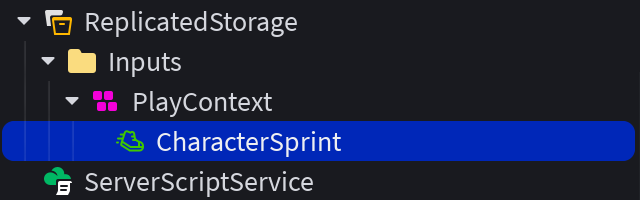
圖 16-2 InputAction 放在 InputContext 內,讓鍵盤、觸控與手把 binding 共用同一個遊戲動作,而不是各寫一套能力邏輯。
本章的 action 是:
WindDash
它可以被多種 input binding 觸發:
Q
ButtonX
DashButton
這樣做比 UserInputService.InputBegan 只檢查 Q 更好,因為本章一開始就支援手機與 gamepad。手機輸入不能等到最後才補,否則 UI、能力流程與測試方式都可能要重寫。
UserInputService 仍然很重要,但它是 client-side service。它適合:
本章不把 UserInputService 當成主要能力入口,是因為 Input Action System 更符合跨裝置能力設計。
RequestAbility 是 client 到 server 的使用意圖:
requestAbility:FireServer("WindDash")
這不是請 server 相信 client。server 收到後仍要檢查:
WindCharm。AbilityUpdate 則是 server 到 client 的結果通知:
abilityUpdate:FireClient(player, "WindDashStarted", WIND_DASH_COOLDOWN)
這和前面任務章的 QuestUpdate 很像:server 決定結果,client 顯示結果。
cooldown 的權威資料放在 server:
cooldownEndsByPlayer[player] = os.clock() + WIND_DASH_COOLDOWN
不要把 cooldown 只寫在 HUD 裡。HUD 可以提醒玩家,但不能當作規則本身。
如果 cooldown 只在 client,惡意 client 可以跳過等待,連續要求加速。server 端 cooldown 是最基本的防線。
TweenService 在本章只用來做視覺回饋,例如讓 cooldown bar 從滿格慢慢縮到 0。
TweenService:Create(cooldownBar, TweenInfo.new(duration), {
	Size = UDim2.fromScale(0, 1),
})
它不能用來判斷能力是否真的恢復。原因很簡單:UI 動畫可能被取消、重播、延遲或被玩家端修改,但 server time 才是規則。
本章要測四個面向。
第一輪:鍵盤
WindCharm。第二輪:Tool
WindCharm。WindDash 流程。第三輪:Mobile / Touch
DashButton。DashButton。第四輪:Client / Server
ServerScriptService.AbilityService 是否存在。Humanoid.WalkSpeed 的實際修改來自 server 流程。這四輪測試能抓到不同類型的錯誤。鍵盤測的是基本流程,Tool 測的是多輸入是否共用 cooldown,mobile 測的是跨裝置,Client / Server 測的是權威邊界。
如果手機按鈕不能用,使用:
【Ch16 修正 1|加入 Mobile WindDash】
WindDash 可以使用鍵盤 Q 鍵觸發,但無法在行動裝置使用。

預期結果:
- StarterGui.AdventureHUD 應該包含 DashButton。
- WindDash InputAction 應該有連接到 DashButton 的觸控綁定。
- 按下 DashButton 時,應該和鍵盤 Q 鍵一樣請求同一個 WindDash ability。

請只檢查:
- ReplicatedStorage.Inputs.PlayContext.WindDash
- StarterGui.AdventureHUD
- AbilityHUDController

不要修改 AbilityService 的 server cooldown 邏輯。
如果玩家可以連續加速,使用:
【Ch16 修正 2|套用 WindDash cooldown】
WindDash 目前可以連續觸發,沒有遵守 cooldown。

預期結果:
- WindDash 上一次通過驗證後的 6 秒內,AbilityService 都應該拒絕再次使用。
- cooldown 必須在 server 使用 os.clock() 或同等的 server-side 時間進行檢查。
- HUD 的 cooldown tween 只負責視覺效果,不能作為權威判斷。

請檢查 ServerScriptService.AbilityService。
不要只在 LocalScript 修正這個問題。
如果 Tool 和 Q 鍵 cooldown 不共用,使用:
【Ch16 修正 3|統一能力 cooldown】
WindCharm.Activated 與鍵盤 Q 鍵似乎使用不同的 cooldown。

預期結果:
- Tool.Activated、鍵盤 Q 鍵、gamepad ButtonX 與 DashButton 都應該在 client 呼叫同一個 requestWindDash function。
- 所有請求都應該透過 RequestAbility:FireServer("WindDash") 傳送。
- server 的 AbilityService 應該為每位玩家的 WindDash 維護一份共用 cooldown。

請整合輸入路徑,不要複製 ability 邏輯。
如果 Assistant 把 WalkSpeed 改在 client,使用:
【Ch16 修正 4|將速度權威移到 Server】
WindDash 目前在 LocalScript 中修改 Humanoid.WalkSpeed。

預期結果:
- LocalScript 只能傳送 RequestAbility:FireServer("WindDash") 並更新 HUD。
- ServerScriptService.AbilityService 應該負責驗證及修改 Humanoid.WalkSpeed。

請將實際修改 WalkSpeed 的邏輯移到 server。
client 只保留輸入與視覺回饋。
完成本章後,Explorer 應接近這樣:
StarterPack
└── WindCharm

ReplicatedStorage
├── Inputs
│   └── PlayContext
│       └── WindDash
└── Remotes
    ├── RequestGuideHint
    ├── QuestUpdate
    ├── RequestAbility
    └── AbilityUpdate

StarterGui
└── AdventureHUD
    ├── ObjectiveLabel
    ├── HintLabel
    ├── DashButton
    ├── DashCooldownBar
    └── AbilityHUDController

ServerScriptService
├── QuestService
├── EnemyAIService
└── AbilityService
整理時檢查:
AbilityService。AbilityHUDController 不直接改 WalkSpeed。WindCharm.Activated 不直接套用能力,只送出同一個 request。RequestAbility 不接受 client 傳入 cooldown、WalkSpeed 或 duration。DashCooldownBar 的 tween 只是視覺。本章完成後,玩家已經有一個主動能力。接下來第 17 章可以把 Gold 接到商店系統,讓玩家購買或升級這個能力。
本章建立了第一個主動能力 WindDash。它表面上只是加速,但背後已經形成一套可延伸的能力架構:
InputAction / Tool / HUD Button
-> RequestAbility
-> AbilityService server validation
-> server-side effect
-> AbilityUpdate HUD feedback
你學到的重點是:
這套結構會在後面繼續擴充。第 17 章會加入商店與升級,讓玩家用第 14 章任務拿到的 Gold,購買更短 cooldown 或更強的能力效果。
嗨!我是 Wolke,曾任 Google Developer Expert(GDE,2019–2023) 與 LINE API Expert。
我熱衷於研究 AI Agent、n8n 自動化工作流與全端開發架構,致力於將 AI 技術轉化為真正能落地的生產力工具。
如果你喜歡這篇文章,歡迎透過以下方式與我交流:
📚 技術著作
《實用的 Gemini API 開發點子書》:帶你運用 Gemini App、Google AI Studio、Gemini CLI 與 Antigravity IDE,打造 AI Agent 與實用產品。
📝 技術部落格
歡迎追蹤我的 Medium,我會持續分享 Agentic Automation、架構設計與實際開發的踩坑心得。
🎤 技術講座與合作
我持續受邀至技術社群及研討會,分享 AI Agent、自動化工作流、DevOps 與全端開發實戰。
我曾於 DevOpsDays Taipei 2026 主講「不再只是寫腳本!讓 AI 代理人成為你的 SRE 最佳夥伴」工作坊。
如果你的企業、社群或學校正在尋找相關主題講者,歡迎私訊聯繫,洽談講座與工作坊合作!
🎮 我的 Roblox 遊戲
🎁 免費贈送 OpenAI 或 Claude AI 額度
為了鼓勵大家實際動手打造自己的 Roblox 體驗,我每個月會開放:
參加方式:
確認完成後,我會邀請你加入並設定 50 點額度。名額有限,歡迎把握機會!



 iThome鐵人賽
 看影片追技術